


July 30, 2023
The topic of the moment, it is safe to say that Artificial Intelligence has taken the world by storm. It’s in the news almost every day, everyone is talking about it, and millions of people are using it, maybe without even knowing it.
Artificial Intelligence (AI) tools have capabilities that are very similar to humans. In other words, they reason, create and plan, adapting their behaviour as they learn. They’re being used in education, business, human resources, research, writing, programming, marketing, customer care and a whole host of other fields in so many ways.
And that’s why we thought we’d take some time to explore and share with you a few of the most popular free-to-use AI tools that can provide a variety of benefits, for both business and personal use.
ChatGPT
ChatGPT is perhaps the tool that pushed AI into the general public spotlight and transformed the subject into such a conversation piece.
A generative AI chatbot developed by OpenAI, ChatGPT was launched in November 2022. It allows users to have near-human conversations, ask questions and get help with all sorts of tasks. OpenAI trained its chatbots on huge volumes of internet data, and it is this training that has allowed it to generate responses in such a wide variety of styles, and on such a massive range of topics.
By January 2023, ChatGPT had gained over 100 million users, prompting other tech giants like Google and Meta to launch competing products.
There are two versions of ChatGPT. The original version, ChatGPT-3.5, is free to use, and then there’s ChatGPT-4, also known as ChatGPT Plus, which is available only to paid subscribers. The main benefit of the paid version is that it is faster to respond, and offers better problem-solving skills as well as a wider range of general knowledge. But the free version is perfectly suitable for everyday use. All you have to do is create an account, and you’re good to go.
So what exactly can you do with ChatGPT? Really, the limit is your imagination. Here are just a few examples.
How can ChatGPT benefit businesses?
Generate summaries… from creating a report based on minutes taken in a meeting, to converting research notes into a whitepaper, and from summarising an article to creating an executive summary for a business plan, ChatGPT can save huge amounts of time by summing up whatever text you feed it. Bear in mind though that there are word count limits when inputting text, so you may have to enter your content in sections.
Sounding board… particularly useful for solo business leaders, ChatGPT’s ability to act as a brainstorming tool and sounding board is actually quite extraordinary. Whether you are struggling to come up with a title or concept for your next blog, not sure what to share in your social posts, or it’s time to think up a new marketing strategy, ChatGPT can help. And the more descriptive your input, the more detailed and relevant the output you’ll get.
Recruitment… ever struggled to piece together a set of meaningful interview questions that will really help you see whether a candidate is the right person for the job? Step in ChatGPT. Providing you are very clear on the nature of the position, the level of experience they should have, and the necessary skills and qualities, the bot will respond with a set of questions, and will up their complexity depending on the role and how you’ve described it.
Names… ever tried to come up with a name for a new product, process or even a new company and hit a brick wall? From brand names to straplines, ChatGPT can come up with a list of ideas in seconds, where you could have been staring at a blank screen for hours.
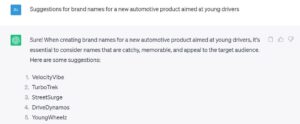
Screenshot from ChatGPT July 2023
And how can we use ChatGPT personally?
CV writing… yes, you will need to input detailed prompts and be very specific with your information, but ChatGPT can certainly help you write your CV, and a covering letter too. Do be sure to review and edit the output though to make sure it’s professional, proof-perfect and accurate. And ask for human feedback before you send it off.
Prepare for foreign travel… from informing you about any entry requirements and vaccinations, to helping you plan your itinerary and recommend places to visit, you can consider ChatGPT your personal tour guide. Of course, you can use search engines for your research, but what you get from ChatGPT is more like a summary of recommendations that has been personally compiled for you. It can even help you understand any customs or etiquette you need to know, such as tipping and dress codes.
Interview practice… ChatGPT has the ability to generate common interview questions for your field of expertise, as well as help you answer questions and improve your answers. It can even give you interview tips and run a mock interview. You can help enhance its responses and make them more relevant by providing resources for review, such as your CV or a job description.
Create a healthy routine… if you’re looking to start a healthy living regime, you can ask ChatGPT for help by sharing details of your daily schedule, any dietary needs and physical challenges that may make certain types of exercise difficult and asking for specific things to be included and goals to be met. Within little or no time, the chatbot will have come up with a daily routine to help you achieve your new health goals.
Wordtune
Wordtune is an AI-powered reading and writing tool that is trained to fix grammatical errors, understand context and meaning, and suggest alternative content, formality or tone whilst retaining the original gist of things.
Wordtune is free to use, although there are daily limits on the number of rewrites. Upgrading to one of the paid plans removes those limits if they start to hold you back.
This AI tool can be used for a range of tasks which can be particularly helpful to business users, as well as students, bloggers, novelists and authors.
Transform scribbled notes into logical sentences… a time-saving tool for meeting minute-takers who can simply paste in their notes and see them assimilated into meaningful transcripts, as well as useful for converting quickly-scribbled ideas into something articulate that can be used as a presentation, blog, story or essay.
Editing and proof reading… even seasoned writers need a fresh set of eyes on their work. Wordtune is adept at catching spelling or grammar errors, as well as suggesting ideas to strengthen content and change the tone to suit a particular audience.
Creating social media posts… every social media platform has different character limits, guidelines and demographics and it can be time-consuming to write posts that fit each of them. Wordtune lets you enter your thoughts to create posts that work for each platform, as well as shortening long form posts to suit the shorter character limits required by the likes of Twitter or Snapchat.
Rewrite content for different audiences… Wordtune can take a piece of content and rewrite it into a different tone of voice, for example casual or formal. It can also shorten text to fit a given word count, and suggest alternative ways to say something to better get a message across. Struggling to know what to write in a personal greeting? Wordtune will help you articulate your sentiment.
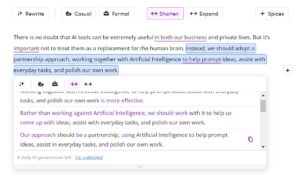
Screenshot from Wordtune July 2023
Perplexity
Perplexity is a free AI tool that allows you to ask any question, of any complexity, and it will give you a quick, detailed answer, complete with cited sources. Whilst you can ask the same of ChatGPT, it’s the listing of the sources that makes the difference. ChatGPT doesn’t share where it gets its facts from.
Whether you’re writing for business, study or pleasure, citing where you obtained your information is a must, as is being able to verify the facts for yourself.
Of course, you can ask questions of search engines, such as Google, and instantly see long lists of information sources. But the difference with Perplexity is that it returns complete answers, all summarised in one place, rather than just a list of results that you have to manually run through and wheedle out the relevant ones.
For example, you could ask Google the question, “What fire safety legislation applies in the UK?”, and you’d see hundreds of results across numerous pages. But with Perplexity, you’ll be given a summarised response, complete with citations that you can check for yourself and use to carry out your own further research. You’ll also get a useful set of related questions.
The information returned is also up to date. This is a major advantage over ChatGPT, which has limited knowledge of world and events after 2021.
A few examples of how to use Perplexity…
Regulatory compliance… not sure what legislation applies within your place of work or industry? Ask Perplexity and it will list the current guidelines and applicable law, complete with links to learn more about each one, and related information, such as penalties for non-compliance. You can also ask it which types of insurance your business needs.
Research… whether you’re writing a blog, an article, an essay or a dissertation, you’re going to need access to statistics and research findings, and you’ll want citations to go with them. Perplexity will deliver a list of stats in answer to any question, complete with those all-important sources.
Itinerary planning… as well as using it for business and study research, you can also use Perplexity to plan days out and explore travel destinations. Ask it for a ‘things do to list’ for any location, and it will return you a comprehensive itinerary, complete with links to learn more about each attraction or suggestion, and images of local landmarks.

Screenshot from Perplexity July 2023
SciSpace Copilot
SciSpace is an AI-powered tool that helps you better understand complicated research and scientific data. It has the ability to explain most academic texts in plain English, removing frustrating jargon and setting out the information in a more easily digestible tone.
Free to use, SciSpace allows you to drag and drop complete files for analysis. You can also add a Chrome extension to your browser which allows you to simply highlight text on any web page for an instant explanation of what it means.
How to use it?
Business… SciSpace is ideal for re-wording complex concepts into reader-friendly content, and for summarising in-depth research into an engaging article that everyone can understand.
Study… SciSpace works well for students (or just inquisitive individuals) who are finding it tough to understand intricate topics.
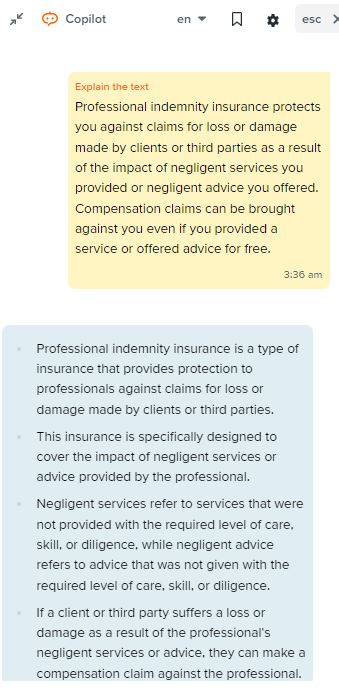
Screenshot from SciSpace Copilot July 2023
Tips on using AI tools
AI tools clearly have their benefits for business and personal use. But they should be used with care.
Instead of using AI tools to replace your own research and creativity, the best advice is to use them as an assistant to give you ideas that you can go on to develop yourself, and to help you get tasks completed faster.
Always:
Fact-check… AI tools like ChatGPT hold extensive knowledge. But they are by no means fool proof. In fact, they are renowned for their inaccuracies and sometimes amusing blunders. Always fact-check anything that is returned by an AI bot, especially if you are intending to share it.
Proofread… Always proofread AI output. You’ll find that most of these tools use US English, so you will need to treat the output more like a draft for editing and toning, rather than final copy. In fact, it’s imperative that you don’t use anything AI-generated word for word. Business and study content should always be unique and will always benefit from a human take and input from personal experience.
Be specific… The more detail you input, the greater the depth of the output. If you are not satisfied with an answer, you can usually provide further direction and ask for a revised response.
Never share sensitive information… AI tools may store the data you enter for future training purposes. Be aware that entering sensitive data or confidential information into a platform may constitute a breach of privacy and data protection regulations. In addition, make sure you set a secure password for any application you use, and only ever download apps from official websites.
In summary
There is no doubt that AI tools can be extremely useful in both our business and private lives. But it’s important not to treat them as a replacement for the human brain. Instead, we should adopt a partnership approach, working together with Artificial Intelligence to help prompt ideas, assist with everyday tasks, and polish our own work.
There has been concern amongst many that Artificial Intelligence may replace humans in some roles. But what these tools are more likely to do is improve productivity by freeing up time for workers to complete more advanced tasks in the workplace, and to enjoy more leisure time in our private lives.
Share This Story, Choose Your Platform!
The topic of the moment, it is safe to say that Artificial Intelligence has taken the world by storm. It’s in the news almost every day, everyone is talking about it, and millions of people are using it, maybe without even knowing it.
Artificial Intelligence (AI) tools have capabilities that are very similar to humans. In other words, they reason, create and plan, adapting their behaviour as they learn. They’re being used in education, business, human resources, research, writing, programming, marketing, customer care and a whole host of other fields in so many ways.
And that’s why we thought we’d take some time to explore and share with you a few of the most popular free-to-use AI tools that can provide a variety of benefits, for both business and personal use.
ChatGPT
ChatGPT is perhaps the tool that pushed AI into the general public spotlight and transformed the subject into such a conversation piece.
A generative AI chatbot developed by OpenAI, ChatGPT was launched in November 2022. It allows users to have near-human conversations, ask questions and get help with all sorts of tasks. OpenAI trained its chatbots on huge volumes of internet data, and it is this training that has allowed it to generate responses in such a wide variety of styles, and on such a massive range of topics.
By January 2023, ChatGPT had gained over 100 million users, prompting other tech giants like Google and Meta to launch competing products.
There are two versions of ChatGPT. The original version, ChatGPT-3.5, is free to use, and then there’s ChatGPT-4, also known as ChatGPT Plus, which is available only to paid subscribers. The main benefit of the paid version is that it is faster to respond, and offers better problem-solving skills as well as a wider range of general knowledge. But the free version is perfectly suitable for everyday use. All you have to do is create an account, and you’re good to go.
So what exactly can you do with ChatGPT? Really, the limit is your imagination. Here are just a few examples.
How can ChatGPT benefit businesses?
Generate summaries… from creating a report based on minutes taken in a meeting, to converting research notes into a whitepaper, and from summarising an article to creating an executive summary for a business plan, ChatGPT can save huge amounts of time by summing up whatever text you feed it. Bear in mind though that there are word count limits when inputting text, so you may have to enter your content in sections.
Sounding board… particularly useful for solo business leaders, ChatGPT’s ability to act as a brainstorming tool and sounding board is actually quite extraordinary. Whether you are struggling to come up with a title or concept for your next blog, not sure what to share in your social posts, or it’s time to think up a new marketing strategy, ChatGPT can help. And the more descriptive your input, the more detailed and relevant the output you’ll get.
Recruitment… ever struggled to piece together a set of meaningful interview questions that will really help you see whether a candidate is the right person for the job? Step in ChatGPT. Providing you are very clear on the nature of the position, the level of experience they should have, and the necessary skills and qualities, the bot will respond with a set of questions, and will up their complexity depending on the role and how you’ve described it.
Names… ever tried to come up with a name for a new product, process or even a new company and hit a brick wall? From brand names to straplines, ChatGPT can come up with a list of ideas in seconds, where you could have been staring at a blank screen for hours.
Screenshot from ChatGPT July 2023
And how can we use ChatGPT personally?
CV writing… yes, you will need to input detailed prompts and be very specific with your information, but ChatGPT can certainly help you write your CV, and a covering letter too. Do be sure to review and edit the output though to make sure it’s professional, proof-perfect and accurate. And ask for human feedback before you send it off.
Prepare for foreign travel… from informing you about any entry requirements and vaccinations, to helping you plan your itinerary and recommend places to visit, you can consider ChatGPT your personal tour guide. Of course, you can use search engines for your research, but what you get from ChatGPT is more like a summary of recommendations that has been personally compiled for you. It can even help you understand any customs or etiquette you need to know, such as tipping and dress codes.
Interview practice… ChatGPT has the ability to generate common interview questions for your field of expertise, as well as help you answer questions and improve your answers. It can even give you interview tips and run a mock interview. You can help enhance its responses and make them more relevant by providing resources for review, such as your CV or a job description.
Create a healthy routine… if you’re looking to start a healthy living regime, you can ask ChatGPT for help by sharing details of your daily schedule, any dietary needs and physical challenges that may make certain types of exercise difficult and asking for specific things to be included and goals to be met. Within little or no time, the chatbot will have come up with a daily routine to help you achieve your new health goals.
Wordtune
Wordtune is an AI-powered reading and writing tool that is trained to fix grammatical errors, understand context and meaning, and suggest alternative content, formality or tone whilst retaining the original gist of things.
Wordtune is free to use, although there are daily limits on the number of rewrites. Upgrading to one of the paid plans removes those limits if they start to hold you back.
This AI tool can be used for a range of tasks which can be particularly helpful to business users, as well as students, bloggers, novelists and authors.
Transform scribbled notes into logical sentences… a time-saving tool for meeting minute-takers who can simply paste in their notes and see them assimilated into meaningful transcripts, as well as useful for converting quickly-scribbled ideas into something articulate that can be used as a presentation, blog, story or essay.
Editing and proof reading… even seasoned writers need a fresh set of eyes on their work. Wordtune is adept at catching spelling or grammar errors, as well as suggesting ideas to strengthen content and change the tone to suit a particular audience.
Creating social media posts… every social media platform has different character limits, guidelines and demographics and it can be time-consuming to write posts that fit each of them. Wordtune lets you enter your thoughts to create posts that work for each platform, as well as shortening long form posts to suit the shorter character limits required by the likes of Twitter or Snapchat.
Rewrite content for different audiences… Wordtune can take a piece of content and rewrite it into a different tone of voice, for example casual or formal. It can also shorten text to fit a given word count, and suggest alternative ways to say something to better get a message across. Struggling to know what to write in a personal greeting? Wordtune will help you articulate your sentiment.
Screenshot from Wordtune July 2023
Perplexity
Perplexity is a free AI tool that allows you to ask any question, of any complexity, and it will give you a quick, detailed answer, complete with cited sources. Whilst you can ask the same of ChatGPT, it’s the listing of the sources that makes the difference. ChatGPT doesn’t share where it gets its facts from.
Whether you’re writing for business, study or pleasure, citing where you obtained your information is a must, as is being able to verify the facts for yourself.
Of course, you can ask questions of search engines, such as Google, and instantly see long lists of information sources. But the difference with Perplexity is that it returns complete answers, all summarised in one place, rather than just a list of results that you have to manually run through and wheedle out the relevant ones.
For example, you could ask Google the question, “What fire safety legislation applies in the UK?”, and you’d see hundreds of results across numerous pages. But with Perplexity, you’ll be given a summarised response, complete with citations that you can check for yourself and use to carry out your own further research. You’ll also get a useful set of related questions.
The information returned is also up to date. This is a major advantage over ChatGPT, which has limited knowledge of world and events after 2021.
A few examples of how to use Perplexity…
Regulatory compliance… not sure what legislation applies within your place of work or industry? Ask Perplexity and it will list the current guidelines and applicable law, complete with links to learn more about each one, and related information, such as penalties for non-compliance. You can also ask it which types of insurance your business needs.
Research… whether you’re writing a blog, an article, an essay or a dissertation, you’re going to need access to statistics and research findings, and you’ll want citations to go with them. Perplexity will deliver a list of stats in answer to any question, complete with those all-important sources.
Itinerary planning… as well as using it for business and study research, you can also use Perplexity to plan days out and explore travel destinations. Ask it for a ‘things do to list’ for any location, and it will return you a comprehensive itinerary, complete with links to learn more about each attraction or suggestion, and images of local landmarks.
Screenshot from Perplexity July 2023
SciSpace Copilot
SciSpace is an AI-powered tool that helps you better understand complicated research and scientific data. It has the ability to explain most academic texts in plain English, removing frustrating jargon and setting out the information in a more easily digestible tone.
Free to use, SciSpace allows you to drag and drop complete files for analysis. You can also add a Chrome extension to your browser which allows you to simply highlight text on any web page for an instant explanation of what it means.
How to use it?
Business… SciSpace is ideal for re-wording complex concepts into reader-friendly content, and for summarising in-depth research into an engaging article that everyone can understand.
Study… SciSpace works well for students (or just inquisitive individuals) who are finding it tough to understand intricate topics.
Screenshot from SciSpace Copilot July 2023
Tips on using AI tools
AI tools clearly have their benefits for business and personal use. But they should be used with care.
Instead of using AI tools to replace your own research and creativity, the best advice is to use them as an assistant to give you ideas that you can go on to develop yourself, and to help you get tasks completed faster.
Always:
Fact-check… AI tools like ChatGPT hold extensive knowledge. But they are by no means fool proof. In fact, they are renowned for their inaccuracies and sometimes amusing blunders. Always fact-check anything that is returned by an AI bot, especially if you are intending to share it.
Proofread… Always proofread AI output. You’ll find that most of these tools use US English, so you will need to treat the output more like a draft for editing and toning, rather than final copy. In fact, it’s imperative that you don’t use anything AI-generated word for word. Business and study content should always be unique and will always benefit from a human take and input from personal experience.
Be specific… The more detail you input, the greater the depth of the output. If you are not satisfied with an answer, you can usually provide further direction and ask for a revised response.
Never share sensitive information… AI tools may store the data you enter for future training purposes. Be aware that entering sensitive data or confidential information into a platform may constitute a breach of privacy and data protection regulations. In addition, make sure you set a secure password for any application you use, and only ever download apps from official websites.
In summary
There is no doubt that AI tools can be extremely useful in both our business and private lives. But it’s important not to treat them as a replacement for the human brain. Instead, we should adopt a partnership approach, working together with Artificial Intelligence to help prompt ideas, assist with everyday tasks, and polish our own work.
There has been concern amongst many that Artificial Intelligence may replace humans in some roles. But what these tools are more likely to do is improve productivity by freeing up time for workers to complete more advanced tasks in the workplace, and to enjoy more leisure time in our private lives.